
More Control Over Smart Follow-ups
We’ve expanded Smart Follow-ups to give you greater control over how follow-up suggestions are generated and prioritized.
Customize smart follow-up rules
Fine-tune how Mailbutler identifies emails that need your attention by configuring the behaviors and thresholds that matter most to you.
You can now create custom rules for:
-
Unopened emails Trigger follow-up suggestions when an email hasn’t been opened after delivery for a specified number of minutes, hours, days, or weeks.
-
Missing replies Get notified when no reply has been received within your chosen timeframe.
-
Quick opens Detect interest when recipients open your email within a defined number of seconds, minutes, hours, or days.
-
Repeat opens Define your own thresholds for high interest and extreme interest based on how many times an email is opened.
-
Link engagement Identify engagement through link clicks, including clicks within a specific timeframe and multiple-click thresholds.
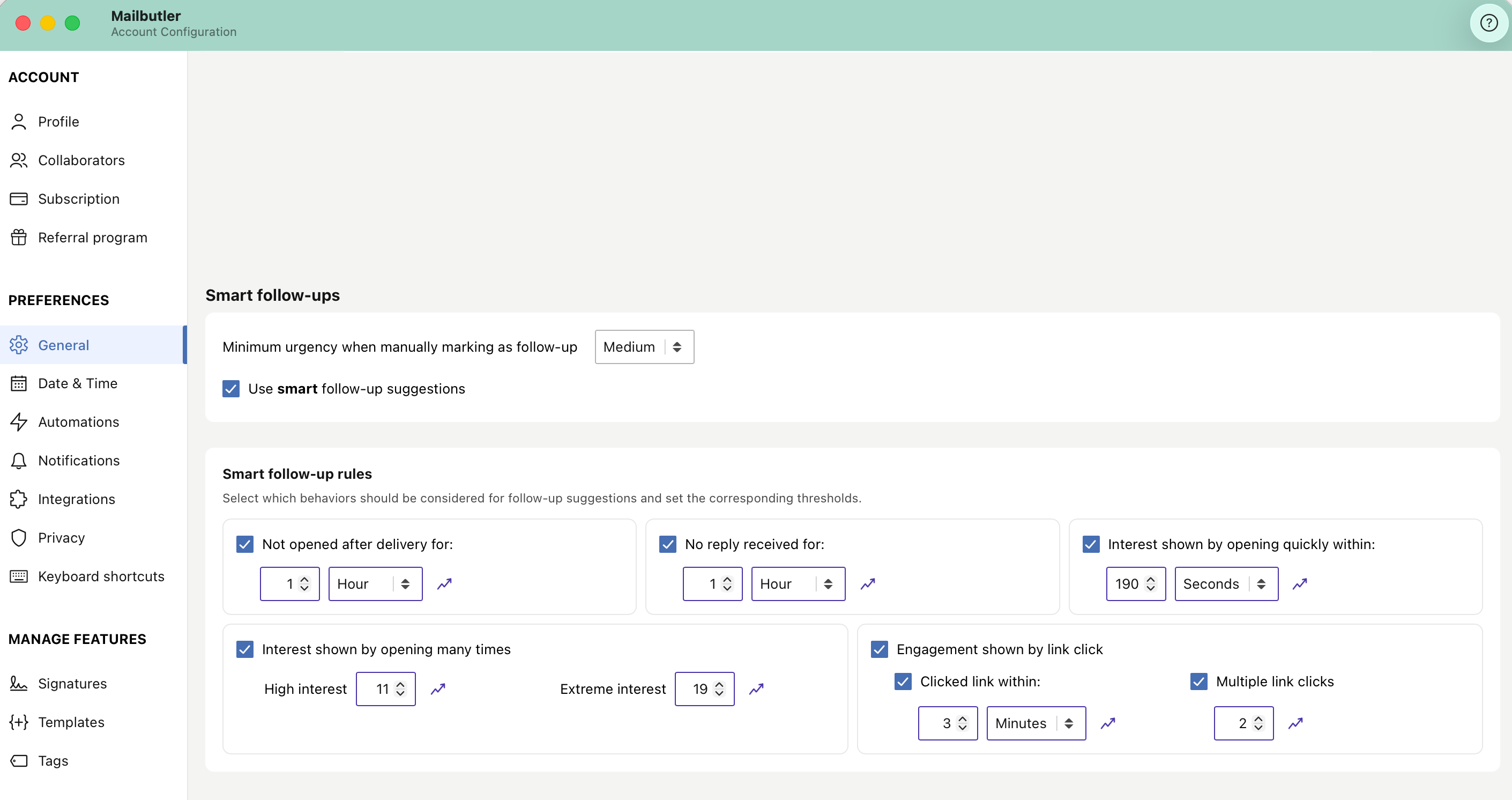
Disable smart follow-up suggestions
Prefer to manage follow-ups yourself? You can now choose to disable smart follow-up suggestions while continuing to use Mailbutler’s email tracking features.
Set the urgency level for manually marked follow-ups
You can now define the minimum urgency level assigned to emails that you manually mark for follow‑up: low, medium, or high.
This ensures your manually marked follow‑ups are prioritized appropriately and appear alongside smart follow‑up suggestions according to your preferred urgency threshold.
Configure everything in one place
All smart follow-up settings can be managed from:
Account & Preferences → General
There, you can adjust urgency levels, enable or disable suggestions, and customize the rules that power your follow-up recommendations.
Smart Follow-ups should work the way you work. Explore the new settings, tailor them to your workflow, and let us know what you think!