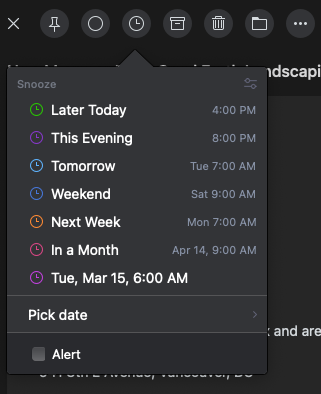
Joshua, the fully customizable time intervals are unlikely coming back, but if you told us about your use case or workflow, then we could come up with something for the next release
Fabian: I tend to use 4 hour delays for sending (preventing ping ponging). Other than that, next business day is a killer feature for me. (I believe that got removed). I also use next week, and specific snoozing and send later
Fabian: Please bring make a "next business day" preset at minimum.
Joshua, we plan to add an option to use working hours for the Send Later dialog. By this, you can use the "Tomorrow" option, which effectively means "Next working day" when the aforementioned option is active.
Fabian: That's a good work around - but I think the ability to do both is important - I have one mail program for both personal and business
Improved time presets are part of our latest release
emails should reappear at the top of the inbox when they become un-snoozed. If an email un-snoozes after a week I will never see it if it shows up back in it's original position -this is the way gmail works.
This is the number 1 issue for me to continue using Mailbutler. I've tried it in the Spark mail app and it has the ability to snooze until "later today, tomorrow, weekend, next week, in a month, and custom." These can all be configured with default times, as in tomorrow means tomorrow at 7 AM, not 24 hours from now as with Mailbutler. Please make this happen.
+1 on snooze customization, additional presets and keyboard shortcuts. I used to use something called AirMail which included these features. My most common workflow was to use a keyboard shortcut to reveal the snooze pane and select the "this weekend" option. This would snooze my email to Saturday at the preconfigured start of my day. This is the missing ingredient to a stellar MailButler workflow. One related nitpick is that the current "use custom date" option uses the present time rather than the start of day. This means that to snooze to a non-preset day, I have to first set the date and then set the time. Would be so much simpler if I could just click the date (e.g. Saturday) and not have to enter the time to my preset start of day. Thank you for your consideration. Cheers.
Fabian Thanks for the recent time presets. Is there a plan to add "this weekend" as a preset? Perhaps I'm unique, but my most common action is to snooze something received during the week until the weekend when I have more time to address. Happy to request this via new thread if it would help with consideration. Cheers.
Todd, "this weekend" is already part of the latest time presets. Please make sure that you are using our latest version
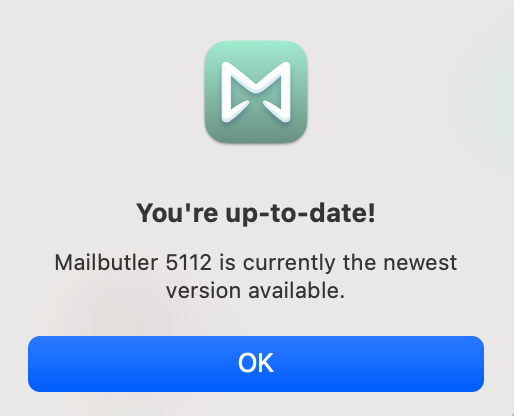
Fabian: Thanks for the response. I'm on "Version: 5112 (2250029)" and don't see it. I just checked for updates and received message that I'm current. I further confirmed that I don't have any "weekday only" snooze constraints. Curious why I don't see these.
Todd, how did you check for updates? Have you clicked on "Check for update" in the sidebar's menu?
Fabian: I have. Here's a screenshot confirming.
Fabian I tried re-downloading and reinstalling Mailbutler and that gave me a newer version that includes this feature. Just appears that the inline `update` feature was not working. Issue resolved. Thanks!
(posting on behalf of a user) Just like you have 9am and 5pm as common options in the top part of the sub-menu, it would be nice to have a couple quick-buttons for those when choosing a custom date, rather than having to type it each time.
Right now, we can set the snooze times but ideally I'd LOVE to have more keyboard shortcuts than just CMD-SHIFT-B for Snooze. I'd love to shortcut, "snooze till the evening/morning" or other such times as well as the default!
Posting on behalf of a user: For both Snooze & Tasks - Can a default option be "End of Week" which will default the snooze/task time to the start of the day on Friday (of the current week). I snooze many of my follow-up's for Friday morning, that way if I dont hear back on something throughout the week, I can follow up myself on Friday before end of business. I do this manually by selecting the day/time, but if it were a default option it would save a couple clicks.
Agreed! Having to manually type in the specific time *every time* makes snoozing so frustrating that it is almost not worth using.
Also, it would be helpful if we could establish our own customized snooze times, like 7am Tomorrow, 7am in Three Days, etc. Many people have a specific time of day that they like to snooze emails to.
I wish snoozed items would go to the top of my inbox.... not back to the original time
I think a number of functions in mailbutler would benefit from automating to "start of business day".
Yeah, you took away the customization - when is that coming back?